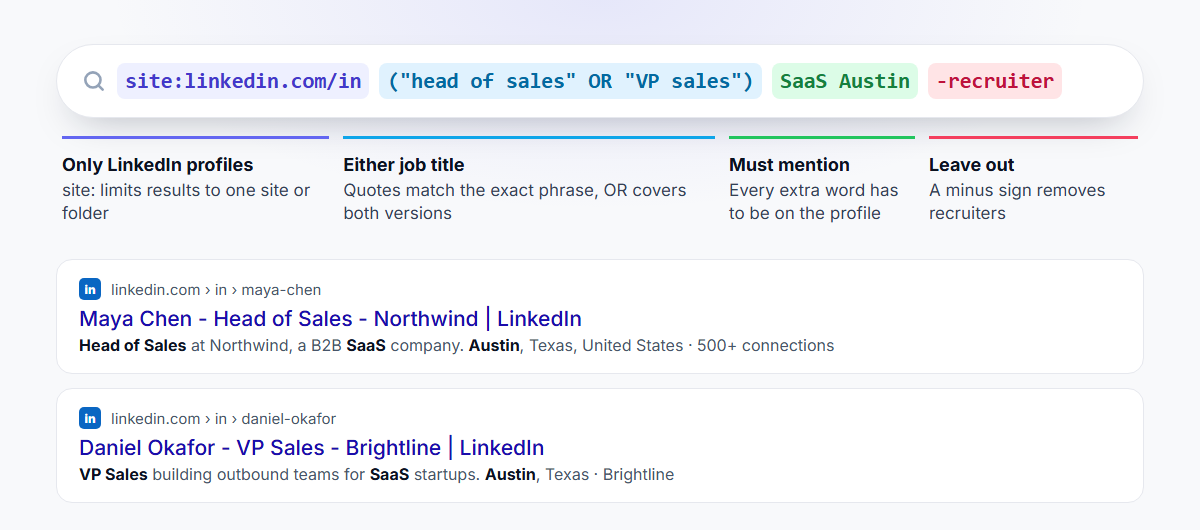
A Google X-ray search makes Google show results from one website only. To X-ray LinkedIn, start your search with site:linkedin.com/in, then add the job title in quotes and any other words the profile should mention:
site:linkedin.com/in "head of sales" SaaS Austin
Every result is a LinkedIn profile that matches. You don't need a Sales Navigator seat, and you're not limited by LinkedIn's own search. Below is how it works, the operators worth knowing, and search strings you can copy for your own prospecting.
What is a Google X-ray search?
"X-ray" is a recruiter's term for searching inside one website through Google. Google has already indexed millions of public LinkedIn profiles. A search operator like site: tells Google to show only those pages, so Google becomes a LinkedIn search engine with its own rules.
That matters for two reasons:
- It works without LinkedIn's limits. Free LinkedIn accounts hit a monthly cap on searches and only show full names for part of your network. Google shows every public profile it has indexed.
- It finds words LinkedIn's filters can't. You can search for any phrase a profile mentions: a tool they use, a market they sell into, a past employer.
The catch: you only see public profiles that Google has indexed, and Google never shows every match. It's a fast way to find people, not a complete list.
How to use Google X-ray search, step by step
1. Point Google at LinkedIn profiles
Start every search with:
site:linkedin.com/in
The /in part limits results to personal profiles, so you skip job posts, company pages and articles.
2. Add the job title in quotes
Quotes make Google match the exact phrase:
site:linkedin.com/in "head of sales"
Without quotes, Google might return a "Head of Customer Success" who once worked in sales.
3. Add who and where
Add words for the industry, location or company. Each word you add must appear on the profile:
site:linkedin.com/in "head of sales" SaaS Austin
4. Cover the other ways people write a title
People describe the same job in different ways. Put the options inside brackets, separated by OR in capitals:
site:linkedin.com/in ("head of sales" OR "VP sales" OR "VP of sales") SaaS Austin
5. Remove the noise
A minus sign in front of a word removes results that contain it. Recruiters and job seekers are the usual noise:
site:linkedin.com/in ("head of sales" OR "VP sales") SaaS Austin -recruiter -hiring
6. Open, check and save
Open the profiles that look right. When a search returns good people, save the exact string so you can run it again next month and pick up new matches.
The operators that matter
| Operator | What it does | Example |
|---|---|---|
site: |
Only shows pages from one site or folder | site:linkedin.com/in |
"…" |
Matches the exact phrase | "account executive" |
OR |
Matches either term (must be capitals) | ("CTO" OR "VP engineering") |
( ) |
Groups OR terms together | (founder OR "co-founder") |
- |
Removes results with a word | -recruiter |
intitle: |
The word must be in the page title, which on LinkedIn is the name, headline and company | intitle:"head of growth" |
* |
Stands in for any word inside quotes | "VP * sales" |
Two things Google ignores, even though older guides still recommend them:
AND. Google already requires every word you type, soANDdoes nothing.NOT. Google treats it as an ordinary word. Use a minus sign instead.
You'll also see filetype:pdf in recruiting guides. It finds CVs uploaded to other sites; it does nothing for LinkedIn profiles.
Copy-paste X-ray search strings for sales
Swap in your own titles, industries and cities.
Sales leaders at SaaS companies in one city
site:linkedin.com/in ("VP sales" OR "VP of sales" OR "head of sales") SaaS "Austin"
Founders in one industry and country. Many profiles are indexed under a country subdomain, so uk.linkedin.com narrows to the UK:
site:uk.linkedin.com/in (founder OR "co-founder") fintech
People at one company
site:linkedin.com/in "Shopify" ("marketing director" OR "head of marketing")
A title that must be in the headline, not just mentioned
site:linkedin.com/in intitle:"head of growth" ecommerce
People who use a tool you integrate with
site:linkedin.com/in ("RevOps" OR "revenue operations") "HubSpot" -recruiter
Account executives, without recruiters or job posts
site:linkedin.com/in "account executive" SaaS -recruiter -hiring -jobs
Posts where people ask for what you sell. LinkedIn posts are indexed too, which makes this one of the best X-ray searches for sales:
site:linkedin.com/posts ("looking for" OR "recommendations for") "CRM"
Companies instead of people. Company pages work as well. Pair them with a size or industry phrase:
site:linkedin.com/company "logistics" "51-200 employees"
Recruiting: engineers in one city
site:linkedin.com/in ("python developer" OR "backend engineer") Berlin -recruiter
Boolean search on LinkedIn itself
LinkedIn's own search bar, and the keyword box in Sales Navigator, use Boolean search too, with slightly different rules from Google:
| Google X-ray | LinkedIn and Sales Navigator | |
|---|---|---|
| Exact phrase | "head of sales" |
"head of sales" |
| Either term | OR |
OR |
| Both terms | Implied, just add the word | AND (or just a space) |
| Exclude a term | -recruiter |
NOT recruiter |
| Group terms | ( ) |
( ) |
A LinkedIn example that does the same job as the first X-ray search above:
("head of sales" OR "VP sales") AND SaaS NOT recruiter
On LinkedIn, put locations and industries in the filters rather than the keyword box. That's where Sales Navigator pulls ahead.
X-ray search vs. Sales Navigator
X-ray search is free and flexible, and it works well for one-off searches and niche phrases. It struggles when you need a full list:
- Google shows a sample of matching profiles, not all of them.
- You can't filter by seniority, company headcount, years in role or recent job changes.
- Results come one page at a time, with no way to save them as a list.
Sales Navigator's filters handle all three, and a search can return up to 2,500 leads. Use X-ray to explore a market or find the odd specialist, and Sales Navigator when you want everyone who fits.
Uses beyond sales
- Recruiting: find candidates who aren't on job boards, using skills and past employers.
- Partnerships: find agencies or consultants who mention a platform you integrate with.
- Market research: see which titles and teams exist at the companies you sell to.
From profiles to emails
An X-ray search gives you people, not contact details. To reach them by email:
- One profile at a time: open the profile and save it to a list with the LeadExportr Chrome extension. LeadExportr finds their work email and verifies it.
- A whole market: rebuild the search in Sales Navigator with the same titles and keywords, then export every result in one click. Our guide on how to export leads from Sales Navigator walks through it.
Tips for better X-ray searches
- Start broad, then narrow. Add one word at a time and watch the results change.
- Search the way people write their headline. "Head of Sales | SaaS | Austin" beats a formal job title.
- Split big searches. If a search returns hundreds of pages, split it by city or title so Google shows more of the matches.
- Keep a list of strings that work. The same search finds new people every month as profiles change.
Frequently asked questions
What is a Google X-ray search?
A Google X-ray search uses search operators, mainly site:, to make Google return results from a single website. Recruiters and salespeople use it to search LinkedIn profiles through Google instead of LinkedIn.
How do I do an X-ray search on LinkedIn?
Type site:linkedin.com/in into Google, followed by the job title in quotes and any keywords the profile should contain, for example site:linkedin.com/in "head of sales" SaaS Austin. Use OR for alternative titles and a minus sign to remove words like "recruiter".
Does Google X-ray search show email addresses?
No. LinkedIn doesn't put email addresses on public profiles. Once you've found the right people, an email finder such as LeadExportr can look up and verify their work emails.
Why don't some LinkedIn profiles show up in an X-ray search?
Members choose whether their profile is visible to search engines, and Google doesn't index every public profile. Google also stops showing results after a certain number of pages, so split big searches into smaller ones.
Does Google support AND and NOT in an X-ray search?
Google requires every word by default, so AND isn't needed, and it ignores NOT. Use a minus sign to exclude a word, like -recruiter. LinkedIn's own search does support AND and NOT.
Is X-ray search better than Sales Navigator?
They do different jobs. X-ray search is free and good for niche phrases and quick research. Sales Navigator has filters for seniority, company size and job changes, and returns full lists of up to 2,500 leads per search.