Sales Navigator's filters are the reason most people pay for it. LinkedIn advertises more than 50, split between lead search (people) and account search (companies). Here's every one, grouped the way LinkedIn groups them in October 2026, plus the combinations that work best for finding buyers.
Lead filters
Lead filters find people. Combine filters from different groups to narrow a search, and pick several values inside one filter to widen it.
Company
| Filter | What it finds |
|---|---|
| Current company | People working at specific companies now |
| Past company | People who used to work somewhere, such as former customers' staff |
| Company headcount | People at companies of a given size, from 1–10 up to 10,001+ |
| Company type | Public, private, non-profit, self-employed and more |
| Company headquarters location | Where the company is based, which isn't always where the person lives |
Role
| Filter | What it finds |
|---|---|
| Function | The department someone works in, like Sales, Marketing or Engineering |
| Current job title | Exact titles, with Boolean support (see below) |
| Seniority level | From entry level to owner and CXO |
| Past job title | Titles people held before |
| Years in current company | How long they've been at the company |
| Years in current position | How long they've been in the role |
Personal
| Filter | What it finds |
|---|---|
| Geography | Where people live, by region or postal code |
| Industry | The industry of their current company |
| First name, Last name | Specific people |
| Profile language | The language their profile is written in |
| Years of experience | Total career length |
| Groups | Members of LinkedIn groups |
| School | Where they studied |
Buyer intent
| Filter | What it finds |
|---|---|
| Account has buyer intent | People at companies showing interest in what you sell, in the past 30 days |
| Category interest | People at companies researching your product category |
| Following your company | People who follow your Company Page |
| Viewed your profile recently | People who looked at your profile |
| Viewed your Company Page recently | Visitors to your Company Page in the past 90 days (Advanced and Advanced Plus only) |
Best path in
| Filter | What it finds |
|---|---|
| Connection | 1st, 2nd and 3rd-degree connections, group members and TeamLink paths |
| Connections of | Connections of a specific person |
| TeamLink connections of | People your colleagues know (Advanced) |
| Past customer | People who worked at your customers |
| Past colleague | People you worked with |
| Shared experiences | People who share a group, school or past employer with you |
Recent updates
| Filter | What it finds |
|---|---|
| Changed jobs | People who started a new role in the past 90 days |
| Posted on LinkedIn | People who posted in the past 30 days |
Workflow
Persona, Account lists, Lead lists, People in CRM, People you interacted with, and Saved leads and accounts. Use them to include or exclude people you're already working with, so a search only shows new prospects.
Account filters
Account filters find companies. They're the place to start when you know your ideal customer by company, not by job title.
Company attributes
| Filter | What it finds |
|---|---|
| Annual revenue | Companies within a revenue range |
| Company headcount | Companies of a given size |
| Company headcount growth | Companies growing or shrinking over the past year |
| Headquarters location | Where the company is based |
| Industry | The company's industry, including sub-industries |
| Number of followers | How big the company's LinkedIn following is |
| Department headcount | How many people work in a department, such as Sales or Engineering |
| Department headcount growth | Departments that are hiring |
| Fortune | Fortune 50 to Fortune 500 companies |
Spotlights
Job opportunities (companies hiring now), Recent activities (such as funding or leadership changes), Connection (companies where you know someone) and Buyer intent.
Workflow
Companies in CRM, Saved accounts and Account lists, to include or exclude accounts you already know.
Keyword and Boolean search
The keyword box, and the job title and company filters, accept Boolean search:
| Operator | Example | Result |
|---|---|---|
"quotes" |
"head of growth" |
The exact phrase |
AND |
SaaS AND fintech |
Both terms |
OR |
CTO OR "VP engineering" |
Either term |
NOT |
sales NOT recruiter |
Leaves the term out |
( ) |
(founder OR CEO) AND SaaS |
Groups terms together |
A few rules from LinkedIn's help centre:
- Operators must be in capitals.
oris treated as a word. - Use straight quotes, not curly ones copied from a document.
- LinkedIn reads a search in this order: quotes, then brackets, then NOT, then AND, then OR.
- There's a limit of 15 operators per search.
- Wildcards (
*) aren't supported.
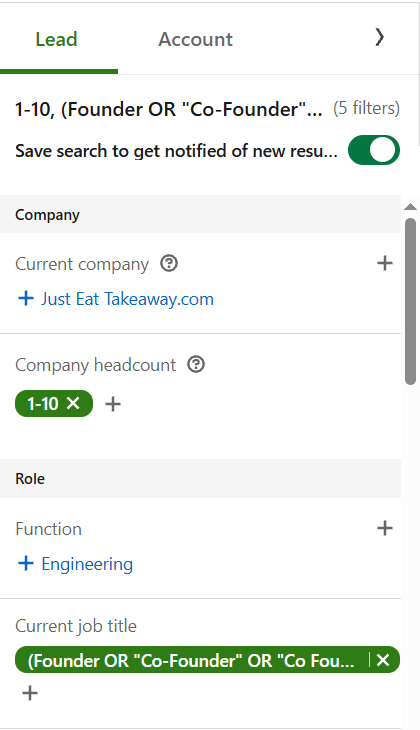
Here's Boolean at work in a job title filter. This search looks for founders at companies of 1 to 10 people, and the title filter catches every way people write "co-founder":
Filter combinations that work
New decision makers. Changed jobs + Seniority: Director, VP or CXO + your target headcount. New leaders review their tools early.
Active people in your market. Posted on LinkedIn + Function + Geography. People who post are more likely to see your message.
Growing companies. In account search, Company headcount growth + Department headcount growth in the team you sell to + Industry.
Warm intros. Connection: 2nd degree + Past colleague or Shared experiences. Ask for an introduction before you cold message.
Lookalikes of your best customers. Past company: your customers + Function + Seniority. People who used you before often bring you to their next company.
Turn your search into a list you can email
Sales Navigator won't let you export these results. LinkedIn doesn't offer a CSV or Excel export on any plan. LeadExportr adds an export button to Sales Navigator and finds each lead's verified email, so the search you built becomes a campaign. Our guide on how to export leads from Sales Navigator walks through it.
Frequently asked questions
How many filters does Sales Navigator have?
LinkedIn advertises more than 50 search filters across lead search and account search. The exact list changes from time to time; the lists above match LinkedIn's help centre as of October 2026.
Can I filter by skills in Sales Navigator?
There's no skills filter. Put the skill in the keyword box instead, using quotes for phrases, like "Salesforce admin". It matches people who mention it anywhere on their profile.
How do I find people who recently changed jobs?
Use the Changed jobs filter under Recent updates. It shows people who started a new role in the past 90 days.
How do I filter by company revenue?
Switch to account search and use Annual revenue under Company attributes. Then open the accounts and look for the decision makers.
What is the Best path in filter?
It shows people you can reach through someone you know: your own connections, your colleagues' networks (TeamLink, on Advanced), past colleagues and shared experiences like a school or past employer.
Can I search Sales Navigator by postal code?
Yes. The Geography filter accepts regions and postal codes.
Can I filter by technology a company uses?
It isn't on LinkedIn's current list of filters. Use the keyword box to find people who mention a tool on their profile instead.