Short answer: yes, if you sell to businesses and look for new prospects on LinkedIn every week. Core costs $89.99 a month on a yearly plan. If one new customer is worth more than about $1,080 to you, a single deal a year covers it.
It's not worth it if you only need a few contacts, if your buyers aren't on LinkedIn, or if you expect it to hand you email addresses. It doesn't, and it can't export your leads either. More on that below.
What is LinkedIn Sales Navigator?
Sales Navigator is LinkedIn's paid tool for finding and tracking prospects. Compared with a free account, you get:
- Over 50 search filters, such as seniority, company headcount, years in role, and people who changed jobs in the last 90 days.
- Up to 2,500 results per search, across 100 pages of 25.
- Lead and account lists, with up to 10,000 saved leads and accounts.
- Alerts when saved leads change jobs or post.
- 50 InMail credits a month, to message people you're not connected to.
- Relationship Explorer and Lead IQ, which suggest who to contact and summarise a lead.
How much does Sales Navigator cost in 2026?
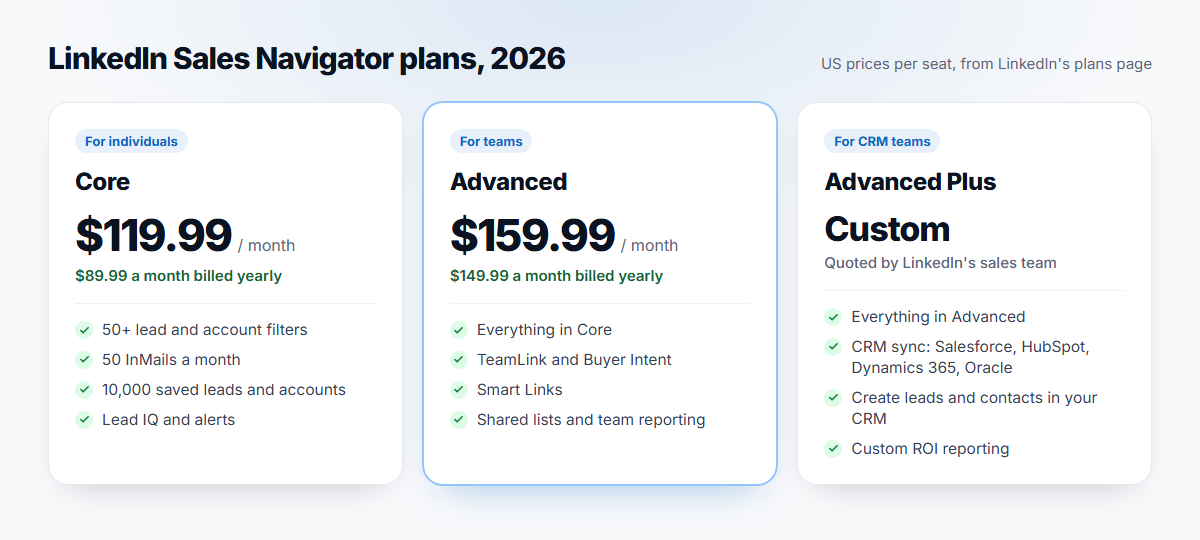
These are LinkedIn's US prices per seat, from its plans page in October 2026:
| Plan | Monthly billing | Yearly billing | Best for |
|---|---|---|---|
| Core | $119.99 a month | $1,079.88 a year ($89.99 a month) | Solo sellers and founders |
| Advanced | $159.99 a month | $1,799.88 a year ($149.99 a month) | Sales teams |
| Advanced Plus | Custom quote | Custom quote | Teams that sync with a CRM |
Paying yearly takes 25% off Core. Prices differ by country and may exclude tax. Our Sales Navigator pricing guide breaks down every plan, including prices in pounds, euros and Canadian and Australian dollars.
What you get for the money
The filters are the main reason people pay. A few that free LinkedIn doesn't have:
- Changed jobs in the past 90 days. New leaders review their tools and suppliers early, which makes this one of the best timing signals in sales.
- Posted on LinkedIn in the past 30 days. These people are active, so they're more likely to see and answer a message.
- Company headcount growth. Growing companies hire, and they buy.
- Buyer intent and "Viewed your profile". These show accounts already looking at you. Some buyer-intent filters need the Advanced plan.
Saved searches matter too. Save up to 50 lead searches, and Sales Navigator tells you about new people who match each week, so your pipeline refills itself.
Who Sales Navigator is worth it for
Solo founders and freelancers doing outbound. Core is enough. If outbound is how you win customers and you'll use it for a couple of hours each week, it pays for itself fast. It's less useful if you only prospect once a quarter.
SDRs and account executives. Yes, and usually paid for by the company. Teams of more than one seller should look at Advanced. It adds TeamLink, which shows warm paths through colleagues' networks, plus shared lists and team reporting.
Agencies building lists for clients. Yes, especially paired with an export tool. One search can cover a client's whole market.
Recruiters. Usually not. LinkedIn Recruiter Lite is built for hiring and fits better.
When it's not worth it
- Your market is small enough to list by hand. If you sell to 40 known companies, free LinkedIn and a spreadsheet will do.
- Your buyers aren't on LinkedIn. Plenty of local businesses and trades rarely log in.
- You rely on inbound. Sales Navigator finds people. It doesn't bring them to you.
- You want email addresses. Sales Navigator doesn't show emails, and 50 InMails a month won't run a campaign.
Pros and cons
| Pros | Cons |
|---|---|
| The best filters for finding B2B buyers anywhere | No way to export leads to a spreadsheet |
| Job-change and activity signals for timing | No email addresses |
| Saved searches that refill your pipeline | 50 InMails a month is a hard cap |
| A free month to try it | Expensive on monthly billing |
The biggest gap: you can't export your leads
LinkedIn says it plainly in its help centre: Sales Navigator doesn't offer a way to export leads or accounts to a CSV or Excel file, on any plan. Advanced Plus can sync with a CRM such as Salesforce or HubSpot, but that plan is only sold on a custom quote.
So you can find 2,500 perfect leads, but you can't take them with you, or email them. That's where an exporter comes in. LeadExportr adds an export button to Sales Navigator, saves every lead in your search, and finds their verified work emails.
Sales Navigator vs. Recruiter Lite
They look alike but do different jobs. Sales Navigator is for selling: lead and account search, buyer intent and CRM integrations. Recruiter Lite is for hiring: candidate search, job-post tools and recruiting InMail. If you do both, pick the one for the work you do most, since neither does the other's job well.
How to try it before you pay
LinkedIn offers a one-month free trial of Core and Advanced. A few things to know:
- You need a card, and the trial turns into a paid plan after a month.
- You're eligible if you don't have a paid LinkedIn plan, including Premium, and haven't had a LinkedIn free trial in the past 12 months.
- LinkedIn emails you 7 days before the trial ends. Cancel at least a day before it renews to avoid a charge.
- A referral gets you more. If a Sales Navigator user refers you, your first 2 months of Core are free.
Plan your trial: build your saved searches in week one, then export and email those leads during the month. That's how you find out whether it pays off.
How to get your money's worth
- Save your best searches and check the new matches each week.
- Start with the timing filters: changed jobs and posted recently.
- Keep lists small and specific, one per campaign or segment.
- Export and email your leads instead of relying on 50 InMails. Our guide on how to export leads from Sales Navigator shows how.
Frequently asked questions
Is LinkedIn Sales Navigator worth it for a solo founder?
Usually, yes, if outbound is how you plan to grow. Core is $89.99 a month on a yearly plan, and one new customer typically covers a year. If you only prospect occasionally, start with the free trial and judge it on the replies you get that month.
How much does Sales Navigator cost?
In the US, Core is $119.99 a month, or $1,079.88 a year. Advanced is $159.99 a month, or $1,799.88 a year. Advanced Plus is priced by quote.
Is Core enough, or do I need Advanced?
Core is enough for one person. Advanced is for teams: it adds TeamLink, shared lists and searches, team reporting and more buyer-intent signals.
Can you export leads from Sales Navigator?
Not natively. LinkedIn doesn't offer a CSV or Excel export on any plan, and only Advanced Plus syncs with a CRM. Tools like LeadExportr export your search and find each lead's email.
Is there a free trial?
Yes. Core and Advanced come with a one-month free trial if you don't already pay for LinkedIn and haven't had a LinkedIn trial in the past 12 months. A card is required.
Is Sales Navigator worth it for recruiting?
Not usually. LinkedIn Recruiter Lite is built for hiring, with candidate search and job tools that Sales Navigator doesn't have.